Who uses it
Independent tuners, workshop benches, and software desks that already edit calibration files. If you flash a BIN after a remap, the ECU will reject it when checksums are stale. SUMX is the last step before that flash.

App introduction
SUMX is a Windows desktop tool for ECU checksum and CRC recalculation. You load a binary, identify the controller, and write the checksum values that file format expects.
Independent tuners, workshop benches, and software desks that already edit calibration files. If you flash a BIN after a remap, the ECU will reject it when checksums are stale. SUMX is the last step before that flash.
It does not remap maps, read a vehicle, or bypass immobilizers. It recalculates checksums and CRCs for files you already have. You still verify the result on the bench before anything is written to hardware.
Walkthrough
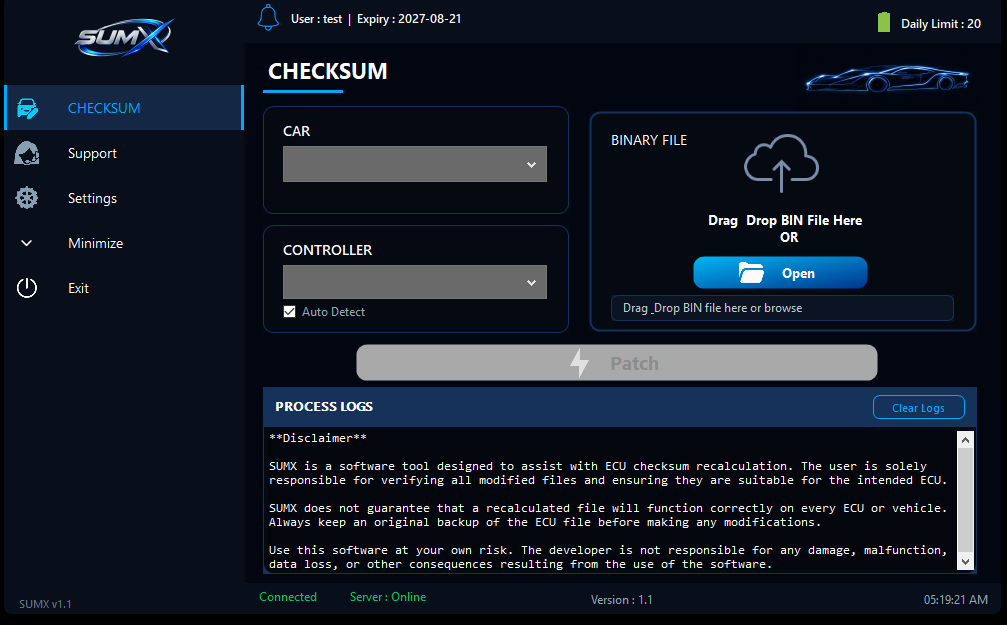
The header shows user name, expiry, and remaining daily limit. Connected and Server Online mean the seat can run a patch.
Choose Car, then Controller. If Auto Detect is on, SUMX tries to match a known controller from the binary. If it cannot, pick the family from the list.
Drop the BIN or click Open. Patch stays disabled until a file is loaded. After a run, read the process log. Clear Logs when you start the next job.
An ECU binary is not only maps. Manufacturers store check values so the controller can tell a complete file from a damaged or half-written one. After you change calibration data, those stored values no longer match. SUMX recomputes them for the controllers on the support list so the file structure stays consistent.
Different families use different algorithms. That is why the car and controller selectors exist: the same BIN size can need a Bosch checksum on one job and a Continental CRC on the next.
The support list is the source of truth for brands and controller families.